


ArcVile
-
Compteur de contenus
47 -
Inscription
-
Dernière visite
Messages posté(e)s par ArcVile
-
-
21 hours ago, bicarus said:
you gotta set loglevel to all and post the whole log.txt
read https://two-torial.xyz/extras/patchsp2x/
I applied to patches following the tutorial, but I seem to have stumbled on another problem.
The game launches but turn off immediately.The original Epolis version I've applied this update is 2023101800. I've overwrote the the files from 2023090500-to-2024070200, downloaded new spice2x as well as asphyxia files.
From the log I've included below, I see this line:
['prop/bootstrap.xml' could not be read as property list]
Maybe I am missing a step? My original Epolis version continues to work smooth at this time.
0 -
On 7/26/2024 at 1:54 AM, mikaelr said:
Resident final to latest Epolis update (LDJ-2023090500 to 2024070200), thanks to Akitake from 1cc for the upload.
https://pixeldrain.com/u/J8ECN5CrAlso, the latest plugin made by xuserv: iidx@asphyxia - v1.4.4_a11 https://pixeldrain.com/u/UAZYcD5Y
Thanks for the content man.
One quick question. Is there a bemanipatcher website available to use for this update? Looks like the old patcher website I had saved is now closed, and the current bemanipatcher I found only supports up to RESIDENT.0 -
I updated my iidx to 20231206 version, which is working just fine in 120fps without sound issues or frame drops.
But I am unable to sign-in my profile card, just giving me a log-in error in the red screen, which takes me back to the main screen.
The 2023101800 version works normal and logs my profile in with all my saved scores etc.
Perhaps the I need to use the updated spice? Anyone else having the same issue?
Posting the log.txt for reference.
0 -
On 4/26/2023 at 6:19 AM, NotEarl said:
LDJ-2023040400
https://pixeldrain.com/u/PVuixUig
Thanks to the 1CC Discord.
https://discord.com/channels/1062739299986067477/1062740112347242608/1100739671631347764
To make omni songs work. . .
Anyone used this to log in your player card?
Offline mode works great. New songs work normally without issues.
However, when I log in and enter the password, it says Connection error.
0 -
To those playing jubeat on the gamo2's FB9 controller, I have a question: On the controller website, it says the monitor NEEDS to have DVI cable. Do I actually need to use DVI cable in order to play the spice. game properly? Does using hdmi cable cause issue with lagging/etc??
I currently plugged it in hdmi. The buttons seem to sync ok I guess. The problem is that the game won't go fullscreen mode. I do not have -w on yet it still has this issue.
 0
0 -
How do you transfer save files from one iidx to another when there isn't a savedata?
When I transferred data from iidx28 to iidx30, I just transferred the [card0] and [savedata] files and it did the trick.
I just got the updated iidx30(2022103100) and tried to transfer the file from iidx30(2022101900), I see the [card0] file, but not [savedata] file.
There are files called [savedata.db.bak] and [minidump.dmp]. I transferred these files along with [card0], but it didn't work, as the game asks me to make new password and account.
0 -
Perfect. Now the iidx30 is working smoothly without issues. Thank you so much for the support! I thought changing to local:8083 only on service_localstrap was enough. Adding local server to <services> above it finally got it working.
As for transferring score data, does it work simply by copy/pasting the [savedata], [card0] from previous iidx to content of iidx30, and then typing the same card number on spice.cfg?
1 -
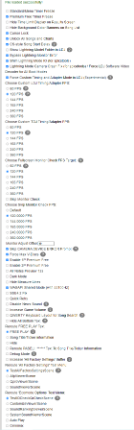
I'm re-up-loading the captures taken as a zip file, since they are too small to visualize.
Also, in regards to @Omar2's response:
1)my internet connection is good.
2)I've unchecked the read-only of the game files - when I open the property again, the files still have it checked though. Unchecked, Applied and ok'd, but still have the read-only checked.
3)in the game shop setting(pics below), I can only change the store name. The e-amusement is ON, and I cant change to OFF(or other option). I've posted the Network check pics for reference.
4)uptobox links I cannot use because of living in US. I apologize.
I have iidx 28 and 29 as well, which both work fine without issue(whether thru Asphyxia or have -ea emulation). This error page only shows up for iidx30.
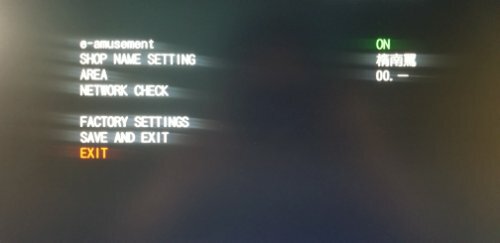
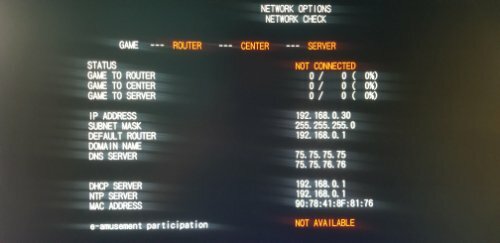 0
0 -
On 11/12/2022 at 3:10 PM, Omar2 said:
run Asphyxia because that what it needs
because its a network problem
<network>
<timeout __type="u32">30000</timeout>
<sz_xrpc_buf __type="u32">102400</sz_xrpc_buf>
<ssl __type="bool">1</ssl>
<services __type="str">localhost/</services>&nb…;and don't use that line 👆
Thank you for the support, but I am still having that e-amusement pass error page.
Just so you and I be on the same page, this is what I have done so far:
1)opened ea3-config.xml files(for both in prop and nvram folder), changed them to <services_localstrap __type="str">http://localhost:8083</services_localstrap>
2)added the Asphyxia files you've posted on Page 27(your post from response to @kanseidorifto05) - during this process, some of the files were replaced.
3)generated card from spice.config.
4)started asphyxia-core-x64 - it first asked me to type [YES] to upgrade, and it worked smoothly.
5)start game, pressed test button to skip 5-2002-000, then to [game mode], then I am still stuck in that same e-amusement error page.
Was there something that I have missed that cause this issue to continue?
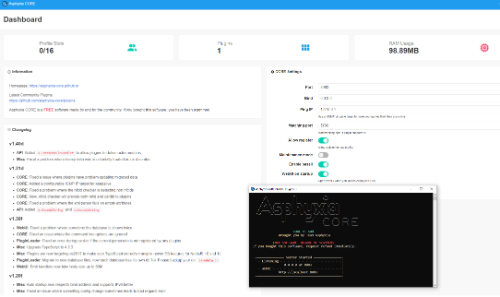
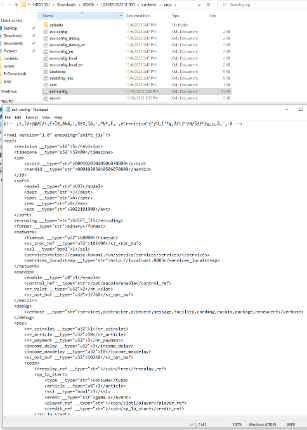
 0
0 -
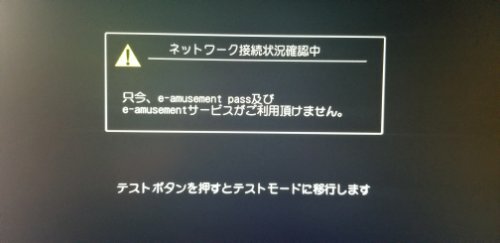
Hello friends. I was able to launch iidx 30, but I've encountered a problem.
I first faced the error 5-2002-000. This was easily resolved with pressing the test button then configuring the clock and store name.
However, when trying to start the game after, I am getting this message about a e-amusement pass(as pictured).
This issue is the same whether I enable or disable the e-amusement emulation.
I am launching this game clean without Asphyxia yet.
How do i go past this error page? Thank you.
 0
0 -
I got the Resident files from Nyaa, the one with 90.1gb
It seems I am having difficulty getting the game to work.
In the log, I do see some issues here:
1) cannot open /dev/nvram/bookkeep0.xm1, (this log continues for bookkeep1 and bookkeep2.)
2) cannot open '/prop/share-config.xml
those are the errors I am seeing. There's also a log that says: pfilter not set. use default rule 'LDJ:JA;A:-' I'm guessing this is not the issue tho.
All I did was added the spicetool files and enabled the ea-musement emulation. I tried starting it both making patches thru bemanipatcher and without any patches, but they are giving me the same errors.
0 -
I finally got the IIDX CH, the version is LDJ-003-2022082400, but this is without asphyxia.
Is there a asphyxia file for this?
I noticed on my Bistrover file, the asphyxia files are in [plugins] folder, so is setting it up as easy as placing this folder in the [content], then starting the asphyxia-core-winx64 file before the game?
Also, if I transfer my [card0] and [savedata] files from bistrover to casthour files then copy/pasting the card number from in spicecfg, will this transfer all the score save files?
Thank you!
0 -
What link are you guys using to get the Casthour? Uptobox doesnt work in US 😞 Maybe I should just wait until iidx 30 comes out and 29 gets uploaded on nyaa.
0 -
Hey guys. I'm currently continuing to play iidx on Bistrover.
Does the link for CH only work outside USA? Also, is it possible to transfer save file from Bistrover to CH by simply copy/pasting the savefile tocthe content, as well as using the same generated gamer ID?
0 -
Thank you @piotr25691 and @lucky777 for the support. I finally got it working!
Also shoutout to @topet2k12001. I got so much support from you when you first made the post. Thank you again!
2 -
On 4/15/2022 at 1:52 AM, piotr25691 said:
Do you have the DLLs from the com folder registered?
Run this command in an administrator command prompt:
for %f in (D:\MDX-001-2022020200\contents\com\*.dll) do regsvr32 %f
(replace D:\MDX-001-2022020200\contents with your path to the game's contents folder)
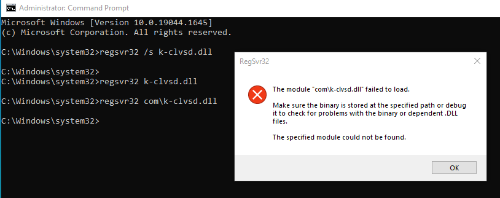
I registered the xactengine2_10.dll file without problem.
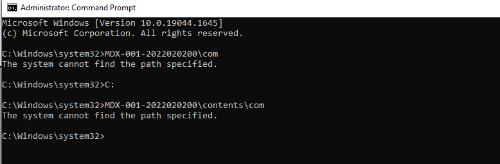
However, the k-clvsd.dll keeps telling me it failed to load - make sure the binary is stored at the specified path or debug it to check for problems with the binary or dependent .DLL files. - The specified module could not be found.
The Game folder(MDX-001-2022020200) is in the Desktop.
Sorry for the late reply. Am I typing something else in the admin cmd?
 0
0 -
57 minutes ago, JoNB3x said:
Can you post what's song are giving the error? make a list for test my self i have the same build from nyaa
It's a mix of new & old songs.
The songs added from 20+ seems to work, but if I patch [unlock songs] from bemanipatcher, none of the songs work, including the older songs.
Songs that are stuck on perma loads include:
-Possession
-All my love
-魔理沙は大変なものを盗んでいきました
etc... I feel like the trend is that the songs with specific music videos or animations, instead of generic ones(with the characters dancing in the back), are having these issues.
0 -
Has anyone experiencing issues with a20+ where certain songs are stuck on perma-loading after selecting them to play? I've got MDX-2021080400 version from nyaa which have this problem, and now my older version is having the same issue as well...
0 -
9 hours ago, SQWERLY! said:
Thank you for the link friend.
I was playing with all the mods and noticed if I enable [unlock song], it causes a problem where I pick a song to play, but it is stuck after the
"first stage" voice and doesn't load from there. I tested every other mods and they all work fine.Anyone else having this issue?
0 -
I recently had to change my computer and I actually got the mdx-2021080400 version that was available from nyaa.
This one does not include neither asphyxia or butterfly.
That being said, is there an asphyxia plugin for DDR, or does it only saves score on butterfly?
Also, is there a bemanipatcher link for this version? The current version on the bemanipatcher is 2020-02-03.
Apologies.
0 -
3 hours ago, rgbmew said:
Did you re-install the C++ Redistributables & DX Runtimes since you got the new SSD? If it's a fresh Windows install, you need to do that again. And you may need to change your audio output to 2 channel, 16 bit, 44100 Hz again. If you're running Omnimix, I had a problem where the game wouldn't see my Modules folder, so I had to copy all of the DLLs from the Modules folder into the same folder as spicetools.
I really didn't wish I wrecked my old ssd. This whole thing seems a bit too complicated for me, as I am not too bright at something like this.so far, I have: 1)changed the audio to 16 bit, 44100hz, 2(moved the dll files from modules to the content folder where spice64 is.My computer is a windows 10 Home = version 21H2.Also, I was not sure if I did this right, so here it is:3)for C++, I went to https://docs.microsoft.com/en-us/cpp/windows/latest-supported-vc-redist?view=msvc-170 = I first got the X64 download, but it didnt work, so I tried the X86 download, it is still giving me the same problem.4)for directX, I went to https://www.microsoft.com/en-us/download/details.aspx?id=35 = I downloaded this.I am still having the same message log pop up. The log says this: [Running Windows 10 "N"?
Grab: https://www.microsoft.com/en-us/software-download/mediafeaturepack
Check: https://support.microsoft.com/en-us/help/4562569/media-feature-pack-for-windows-10-n-may-2020]Maybe this is what I need to update? I not sure how to update this from this point...I not sure which media feature pack I'm supposed to get.Edit - Ok so I tried all 4 media feature pack downloads and they all say NOT APPLICABLE...Thank you so much you guys. I was playing with the install files and actually got it working! Much thanks from here!
0 -
Hey guys. I was hoping if you can help me with this.
I recently had my ssd die on me, and I just got my computer back with the new ssd installed.
Of course, all my stuff on my ssd got wiped out, but I still have all my .spice game files in my hdd.
But when I tried launching them(includes both iidx, sv and popn), it doesnt work and I get this message in the log.
I'm guessing the main issue is the problem relating to: bm2dx.dll not being found, but I did not mess with the files in anyway. All the files are just the way they were before switching out the ssd, so I'm not sure what the issue is.
If anyone can look into this log and see what the issue is, that would be helpful.
Thank you!
Edit: this was tested on iidx 27 I had on my hdd. I previously had iidx28 on my ssd(which is now gone) and I'm re-downloading it from nyaa with Asphyxia. I will update this if I new download works without issue.
0 -
hey guys. Got a quick question. So I launch the game and it works smooth. I am running it on 120hz without much issues.
The minor issue I am having is that during the gameplay, the game will occasionally stutter or lag, which causes the notes to pause or slow down for a bit, then return to normal. But by the time it returns to normal, the sound and the beats are off.
I know that this is a minor issue, or maybe this is the small price to pay for emulating it on the PC, but was anybody having the same issue and was able to fix it?
is this related to the sound being in 16bit 41000hz? is there a difference if it was put on 24bit?
0 -
1 minute ago, ryuzo7980 said:
Thx friend!
0
[Arcade PC] Beatmania IIDX 28 BISTROVER (BEMANI)
dans ARCADE PC DUMP LOADER
Posté(e)
Thanks for the data!
Has there been a working Asphyxia files for the 2025011400 pinky crush patch? The asphyxia from the discord does not seem to work.
Also, I've read in the past about the Epolis play card info not being transferable to the pinky crush update. Is that still an ongoing problem?