


FeelTheXtasy
-
Compteur de contenus
29 -
Inscription
-
Dernière visite
Messages posté(e)s par FeelTheXtasy
-
-
On 6/21/2020 at 10:53 PM, RenegadO said:
Hi everyone, I was reading very good contributions from the community, and well if I have been able to have my DDR gold operational (it took me all day to do it haha) well now out of curiosity I wanted to know if it is possible to add songs from previous versions, also I read that there was an application "ddr to db manager" and edit a file called musicdb.xml at the beginning I did not understand but I think I unpacked the startup.arc file and found the xml file, I opened it with the application but there I stayed and I don't know what else is done after that, maybe someone knows and can help me with that, I'll be grateful
sorry for my bad englishThat's not possible unless you have the SSQ (Steps) file and XWB/XSB (Sound & header) files. Editing the musicdb.xml is just for locking/unlocking purposes and adding songs if you already have the files mentioned before.
On 6/20/2020 at 12:04 PM, DDRANGELO said:algún amigo de latino américa experto en esto del ddr que pueda ayudarme
Mándame un mensaje privado explicándome que has hecho para hacerlo correr, que error te da, etc. y te ayudo. Entre más completo el mensaje privado, mejor
 1
1 -
10 hours ago, D4RY11 said:
Does anyone there download this in limetorrents?
Is there a guide to run this game using Asphyxia?
Does Asphyxia works in Sound Vortex 4
1-. Idk.
2-. Change the service URL in your ea3-config.xml to http://localhost:8083. Open Asphyxia, then open the game.
3-. Yes, it does.0 -
16 hours ago, mambila2001 said:
Eh, still the same. Thanks for the idea nonetheless
What I have installed in my laptop:
- AdoptOpenJDK JDK with Hotspot 11.0.7.10 (x64)
- Java 8 Update 251
- Java 8 Update 251 (64-bit)
- K-Lite Mega Codec Pack 15.4.4
I hope that helps you somehow.
0 -
20 hours ago, harlow said:
excuse me. What should I write in the "Start server.bat" in this new versión of butterfly?
I am using the older one (1.1.0) and I put this:java -Ddb_path="C:\Users\villa\Dropbox\butterfly\db.sqlite" -jar butterfly-1.1.0.jar
It Works perfectly but In this new versión I cant make it to work. I apreciate that you share with us this new versión but I just cant use it propperly. Can you or someone help me, please?
· This version looks for the database "butterfly.sqlite" at the same directory where it's being executed. So the bat only needs the command java -jar Butterfly.jar.
0 -
10 hours ago, mambila2001 said:
I can't get butterfly to work with the latest update of A20 , it throws a 5-2002-2403 error, despite the request being received by the server ("ButterflyHttpServer - Request received: MDX:A:A:A:2020020300 (services.get)")
Any fix ?
I hope you're using the database that's in the rar. I don't know precisely why with other databases and the one it generates it doesn't work and the DDR client makes no connection to Butterfly.
0 -
2 hours ago, JSP96 said:
Hi, I've trying to do this, but when I open my butterfly.sqlite DB, it looks that I don't have any profile in the ddr_16_profiles table. (I can log in with Butterfly and save scores without any problem in my A20 Gold Version).
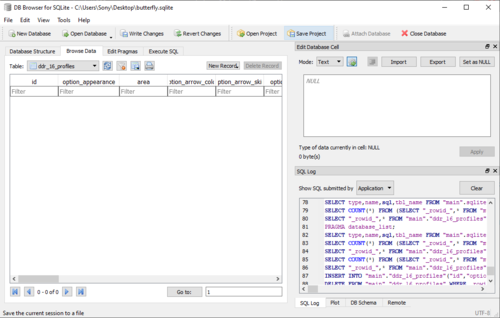
Is this normal and do I have to create a new record in this table?
No, it's not normal. Check if you have some data at the 'cards' table.
I'd recommend to extract again the database from the rar, overwrite it and use it from zero again.
As some people mentioned before, check if your antivirus is preventing the db from writing new information 'cause there should be a profile for your e-Amusement card...
0 -
14 hours ago, harlow said:
I see this is tbe blue theme. Thank you so much for the links 😍.
Is there any way for getting the golden theme? 😁
DLLs: http://www.mediafire.com/file/8g1mnaerhrav9jz/2020040300-contents.rar/file (Unrar / Uncompress at <DDR A20 Folder>\contents\)
Background Videos: https://www.mediafire.com/file/nl9n8a8ugxnpk1q/ddra20_bg_gold.rar/file (Unrar / Uncompress at <DDR A20 Folder>\contents\data\mdb_apx\movie\background\)
You're welcome
2 -
4 hours ago, Devhux said:
I don't believe Extra Encore Stage is available - unless I'm not playing a song that is required.
Overall I'm having a lot of fun with this! I did fix my issue with it defaulting to showing the Calories screen (modify ddr_16_profiles -- Should_Display_Weight = 0 in the "butterfly.sqlite" database). so now it defaults to showing judgement. Wish we could have it remember the unlocked songs that appear when entering your card PIN as well as disable the "Grand Finale" screen at the end of each song, but those are minor quibbles for a game that's working perfectly otherwise.
I just miss the DDR Extreme interface for the arrows! (I think they're slightly smaller than the A20 interface - just found I can read things faster/easier if I pick one of the DDR Selectons songs from Max-Extreme).I think "Grand Finale" can't be modified.
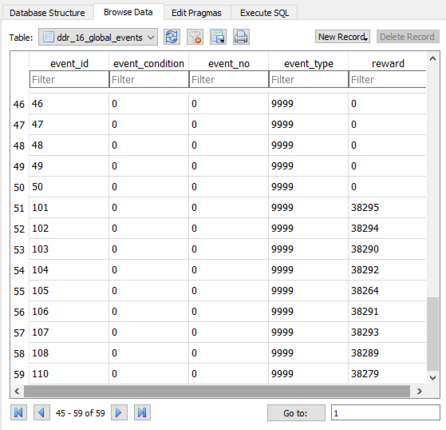
For the songs at the card screen, modify the values at ddr_16_global_events from 10 to 9999.
 1
1 -
1 hour ago, silkroad74 said:
Could you please help me, I've even uninstalled my antivirus (eset nod), I'm using the neutrino server since the butterfly won't let me start because my username has á, eg user / á, then when it reads id the game closes, or when used in maintence mode it closes after playing 3 songs, I have the codec, vlc, directx 12 and everything else, please help, I use the torrent version,i would like to play online mode with card id ,please help me ,thanks ,and i speak a little english i use google trauct...
Neutrino is not supporting 2019090300 or newer data. Afaik, that project is dead because of Butterfly and it only supported DDR A 2018042300.
If your user has an "á" in the folder name, MOVE BUTTERFLY TO C:\Butterfly or C:\Program Files (x86)\Butterfly. Also, I hope you're using the version I uploaded
(Provided by Mr. Boo). That version supports 2019090300 and newer versions partially. Remember to install latest Java version from https://www.java.com/en/download/1 -
1 hour ago, One Eternal Ash said:
https://p.eagate.573.jp/game/ddr/ddra20/p/music/index.html?offset=0&filter=7&filtertype=16
KONAMI might have removed them but we don’t know if the older updates before 2020020300 had the challenge charts for those two songs
Let's get this straight. The 2020040300 version is a FAN MADE PATCH based on 2019090300. It's not official but it feels really close. Steps were made with some tools (That's why a couple of challenge charts are missing and Silly Love too), audios were ripped and re-encoded and I have to say, it's pretty well done... but if this was the real data, we should have the (missing) assets for the Golden League.
1 -
3 minutes ago, vinson77 said:
The Anti-virus that I'm using since 2013:
Symentec Endpoint Protection
It had protected my unit from malicious attacks be it from malicious offline file or any online activities.
i... see...
Well, good to know that you can play with Butterfly now.
Good luck my friend!
0 -
1 hour ago, Misterkister said:
Okay, so I re-downloaded the files, followed the instruction yet again, spicetool is opening up as working, game is opening up just fine BUT the in-game setting is still not saving as it crash after Now Saving screen.
I think it has something to do with this issue: [2020/05/20 12:13:25] F:saveTestModeValueXML: testmode : save file failed.
I attached the log.
CCleaner didn't really help me that much either even though I actually use it for registry fix.
Did I also right-click and troubleshoot compatibility on spice.exe? No, I just troubleshoot compatibility on spiceconfig.exe.
1-. Just to be sure, replace your DDR A20 Folder DLLs and prop folder with the ones I shared a while ago: http://www.mediafire.com/file/8g1mnaerhrav9jz/2020040300-contents.rar/file
1-. Go to your DDR A20 Folder properties and check "Read-only".
2-. Apply the changes. Include sub-folders and all files in that folder.
3-. When it's done, go to DDR A20 Folder properties and uncheck "Read-only".
4-. Apply the changes. Include sub-folders and all files in that folder.5-. Open Butterfly and check it's running fine.
6-. Delete 'nvram' and 'raw' folder inside 'conf' folder.
7-. Go to the DDR A20 Folder and run gamestart.bat.
8-. If it works, change free play for coin mode in the test menu.
9-. Report back here!
0 -
1 hour ago, vinson77 said:
I have extracted the contents of this archive to my copy, (deleted my existing NVRAM folder, created a new card.txt) and followed your instructions on page 10. Suddenly the Courses Tab is nowhere to be found...(disable Free on 1st Play inside Coin Mode)Wow! I stand corrected.
 Thank you very much for your sincerest help FeelTheXtasy. ( " , )
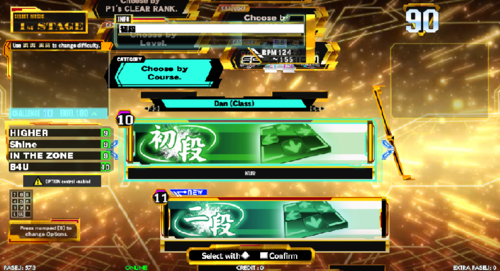
What I did:
1. extracted the contents of the Butterfly Server Custom Fork on the "Desktop".
(make sure that you overwrite the existing instance of your old butterfly.sqlite. using the old one will break scores saving functionality and dan courses unlock)
2. deleted my NVRAM Folder
3. extracted the contents from the archive that FeelTheXtasy had shared
4. cleared any card association on the spicecfg.exe
5. run the included gamestart.bat only once and setup necessary settings like Clock, disabling the Free on 1st Play option inside Coin Mode, etc.
6. exit the game
7. created a new card0.text (this is very important - using an old one doesn't guarantee you that your scores will be saved)
8. make a shortcut to your desktop of spice.exe.
9. open the new shortcut properties and edit it like this in the TARGET line: <DDR A20 Folder>\contents\spice.exe -netfixdisable -io -ddr -h 33554432 arkmdxp3.dll10. "disable any anti-virus" as it affects the Butterfly Server writing capabilities
(trust me on this one. I struggled for more than a week in resolving my Dan Courses unlock issue)
11. run the butterfly server bat
12. run spice.exe shortcut on the desktop
Just some corrections:
Step 1-. I wrote in the Butterfly "New Build" post that you needed to use the butterfly.sqlite that comes inside the rar. Otherwise, it won't work.Step 2-. I'm not sure if that does something actually, but I'm ok with this.
Step 3-. I don't really know if that made any change for what you needed, but I'm ok with this too lol
Step 4-. Unnecessary. All you need to know is any e-Amusement card starts with E004 and 12 more numbers or A-to-F characters so you can always use your old card0.txt 'cause it's only 16 digits/characters for your "eA ID".
Step 5 & 6-. Totally necessary if it's your first run. If you wanna play the Dan courses or Nonstop courses, you have to change from Free Play to Coin Mode.Step 7-. Unnecessary. card0.txt only hold your "Card ID". if you're using a new database, then it doesn't matter what card you're using. If you're using an old one, you didn't read sh*t in this post and you deserve to not run it haha.
Step 8 & 9-. Totally fine if you don't wanna be running a bat file everytime you wanna play.
Step 10-. Please, @vinson77, share with us what antivirus are you using. I never had any problem with NOD32 and Avast (In another laptop). Never knew of an antivirus that blocked writing to a local database from a local client.
Step 11 & 12-. Most important thing around if you wanna play this data lol.
Greetings and I'm glad that it's working
0 -
1 minute ago, vinson77 said:
Could you share your gamemdx.dll...
Better yet, I'm sharing all my contents' DLL files and prop folder (
No, it doesn't have a PCBID for *THAT* server).Everything else is on your hands, guys 'cause I've posted almost everything that's in my hands and I won't upload the full game 'cause I'm lazy as f*ck lol
Good luck.
http://www.mediafire.com/file/8g1mnaerhrav9jz/2020040300-contents.rar/file
1 -
5 minutes ago, vinson77 said:
Help us then. I am using polivo's DDR A20 Gold gamemdx.dll... I can't unlock Dan Courses no matter how many times I clear the 1st Dan Course. I have sent you a PM. Kindly check my inquiry.
I just answered all your questions in that post (Check latest edition).
I can't do more than I already did. I gave you steps to follow in this very thread and if that doesn't help, well, it's out of my reach because I didn't do ANYTHING more than what I've posted here.
Good luck!
0 -
43 minutes ago, vinson77 said:
Dan Courses are still not working on A20 Gold. We are currently stuck on 1st Dan regardless of clearing the Course with AA Full Combo.
Uhmmm... how do I tell you this...


Also, answering what you asked me on a PM:
- Java Version?: I have installed in my laptop Java 8 Update 251 (Latest version), Java 8 Update 251 (64-bit) and AdoptOpenJDK with Hotspot v11.0.7.10 (That one was installed because I needed it for building Butterfly... but I didn't succeed on that).
- Anti-Virus enabled?: NOD32 v13.1.21.0 enabled.
- Butterfly.jar and Butterfly.sqlite placement?: C:\Program Files (x86)\Butterfly
0 -
I guess that everyone that are claiming that the other fork of Butterfly isn't working, haven't edited prop\ea3-config.xml and updated their network brackets...
<network>
<!-- XRPC のバッファサイズ。 -->
<sz_xrpc_buf __type="u32">102400</sz_xrpc_buf>
<!-- https を使うかどうか。 -->
<ssl __type="bool">1</ssl>
<services>http://localhost</services>
</network>Originally, Butterfly asked for <ssl __type="bool">0</ssl>. Did you all try to change that because the Butterfly build that I posted REQUIRED the bool attribute?
0 -
50 minutes ago, BlueSupernova22 said:
how do you apply the e-amusement web option such as arrow skin, dancer, screen filter etc?. I mean the creator did say that these options can be added into the db.sqlite but he didn't say how. I can open it with the db database browser but i don't know how to add in the options.
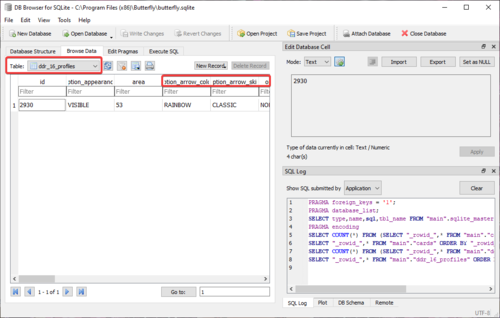
Browse Data -> Table: ddr_16_profiles -> Click on the cell you wanna edit -> At the grey block at the right under 'Edit Database Cell' modify the data with the options provided -> Apply -> File\Write Changes.
- dancer_character: RANDOM, RANDOM_MALE, RANDOM_FEMALE, YUNI, RAGE, AFRO, JENNY, EMI, BABYLON, GUS, RUBY, ALICE, JULIO, BONNIE, ZERO, RINON (Ryusei characters don't work).
- option_arrow_skin: NORMAL, X, CLASSIC, CYBER, MEDIUM, SMALL, DOT, BUTTERFLY.
- option_screen_filter: OFF, LIGHT, MEDIUM, DARK.
- option_guidelines: OFF, ARROW_TOP, ARROW_CENTER.
- option_judgement_layer: FOREGROUND, BACKGROUND.
- show_fast_slow_results: 0, 1.
0 -
2 hours ago, MrBoo said:
Anyone know the Events (51-100) data for butterfly. I think it's for the courses that are missing???
More importantly what are the changes to player data packet - that should fix the "data may not save correctly".
BTW the butterfly.sqlite from the 20191018 butterfly above, looks like the one I made because it's got my local IP addresses of two machines there on different networks lol.
Butterfly 20191018, if it's same as the one I posted elsewhere, with a specific butterfly.sqlite should run DDR A20 without any hex edit on gamemdx.dll or spice EA / Smart EA.
If you delete the file and get butterfly to recreate it, you'll probably get network error, even adding the events - that was a strange one! I think you just need to boot it with DDR A first.
It's probably the one you posted haha. I just added the icon.
Thanks for that build and that DB. See you in 'the other forum'
 0
0 -
1 hour ago, BlueSupernova22 said:
First off It doesn't matter where they are located as all they have to do is be in the same folder and they will work (because even if i put the files on my desktop NOTHING CHANGES it still says the exact same thing crashes) and second the Ddb_path path within the run server bat file is just where db.sqlite file will be saved
Update: after reading my screenshots and doing some research it looks like its trying to start a server with a port that is already being used by another process judging by this (java.net.BindException: Address already in use: bind) thing is I dont know what port butterfly is trying to use to start or what process is using the port
Port 80.
0 -
Oh, I forgot to share this. Someone was nice enough to add some fixes to Butterfly and build it.
Here it is: https://www.mediafire.com/file/k7736gjd1s291os/Butterfly_(Build_20191018).rar/file
What's new:
- Tables for events are already added. Whenever you start your coin, it will announce some new songs added.
- This version looks for the database "butterfly.sqlite" at the same directory where it's being executed. So the bat only needs the command java -jar Butterfly.jar.
- The DB included comes from zero, but it's different from the one that the JAR generates. DDR A20 will always fail to connect to EA if you don't use the DB inside the rar.
-
It's saving scores. At least, the score for ΩVERSOUL during my play was saved. And it shows Dan progress in the card screen, @polivosm

- 1st to 8th Dan available. Maybe Polivosm can lead us into Golden League and other 9th Dan, 10th Dan and Kaiden.
- Sometimes it says that the card save was unsuccessful but I haven't had a problem with that. All data has been perfectly saved.
- Added an icon I made a long time ago because I thought it looks nice as the icon for a shortcut to the bat.
1 -
On 5/14/2020 at 11:25 AM, enciso0720 said:
Please, can you send me the file arcutil.exe by private message? Thank You
On 5/14/2020 at 3:38 PM, anonsec said:Where can I find arcutil.exe?
Well, the arcutil.exe is part of the DDR A DB Manager... but here it is: https://www.mediafire.com/file/ldir2ar6e80si8g/arcutil.exe/file
17 hours ago, Darkogazza said:Hm, I'm still having difficulty getting things up and running even with the fantastic post by One Eternal Ash. At this point it appears to be booting successfully but the screen just stays black and nothing ever actually appears. I assume that download should just work out of the box, with no additional files required? I'm going to try to re download it and see if I'm just having a corruption issue.
1-. Install "K-Lite Mega Codec Pack": https://codecguide.com/download_k-lite_codec_pack_mega.htm || This will let you run even donuts on your pc / laptop.
2-. Install "Java": https://www.java.com/en/download/ || This is needed to run Butterfly (And I'm assuming you downloaded Butterfly in this thread just as the modified gamemdx.dll).
3-. Make sure you run the .bat included in the DDR A20 data at least once. Because you need to register some dlls. If it's not in there, copy the following code into a notepad window, then save it as "gamestart.bat":@echo off cd /d %~dp0 if not exist conf\nvram mkdir conf\nvram if not exist conf\nvram\ea3-config.xml copy prop\eamuse-config.xml conf\nvram\ea3-config.xml if not exist conf\nvram\coin.xml copy prop\coin.xml conf\nvram\coin.xml if not exist conf\nvram\eacoin.xml copy prop\eacoin.xml conf\nvram\eacoin.xml if not exist conf\nvram\testmode-v.xml copy prop\testmode-v.xml conf\nvram\testmode-v.xml if not exist conf\raw mkdir conf\raw regsvr32 /s com\k-clvsd.dll regsvr32 /s com\xactengine2_10.dll start spice.exe -w -netfixdisable -io -ddr -h 33554432 arkmdxp3.dll %*What will do this script?
a-. Make NVRAM folder inside CONF.
b-. Copy some necessary xmls from PROP to the NVRAM folder (So if you edit your prop\ea3-config.xml, make sure you copy it over conf\nvram\ea3-config.xml just to be sure).
c-. Register k-clvsd.dll and xactengine2_19.dll into the system.d-. Start the game some parameters. -w is for Windowed mode. If you want it full screen, just delete -w.
4-. Confirm that you edited your ea3-config.xml as the following pic.
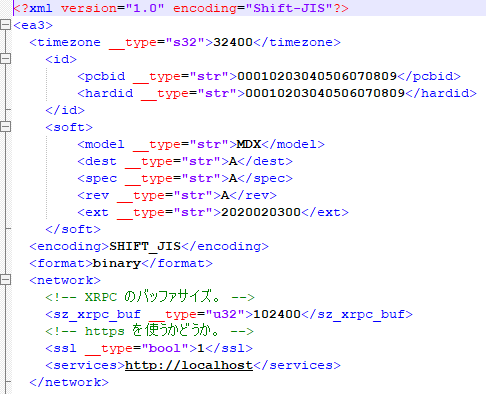
5-. After you did all what I mentioned before, make a shortcut to your desktop of spice.exe.
6-. Open the new shortcut properties and edit it like this in the TARGET line: <DDR A20 Folder>\contents\spice.exe -netfixdisable -io -ddr -h 33554432 arkmdxp3.dll7-. Don't forget to create a txt with your "e-Amusement card". Just open a notepad, write E004XXXXXXXXXXXX (12 random characters between number and A to F. That's up to you.) and save it as card0.txt or whatever name you wanna use.
8-. Now open your spicecfg.exe that's in the DDR A20 folder and configure your keys and your card (That should be pretty intuitive and obvious). In the KEYPAD tab, click on the [...] right next to CARD PATH. Select your card0.txt. Also don't forget to pick whatever keyboard you're using to launch e-Amusement in that tab. After you make all those changes, just close spicecfg.
9-. Now I hope you already know how to launch Butterfly, so do it. When it's ready, launch DDR A20 from the shortcut. Have patience, it takes some time when you launch it after you turned on your Pc or a system restart.
9-. Voilá!
0 -
4 hours ago, JSP96 said:
I launch it using the .bat
Here are the bat parameters: spice -io -ddr -arkmdxp3.dll
In the spicecfg.exe the parameters used are the -url and -p
Here is the log.txt. Also, the bat if necessary.
You're missing the heap size.
Look at my parameters: -netfixdisable -io -ddr -h 33554432 arkmdxp3.dll
4 hours ago, johnjorell said:Anybody has A20 gold BGA? Thanks.
Here: https://www.mediafire.com/file/nl9n8a8ugxnpk1q/ddra20_bg_gold.rar/file
Uncompress at <DDR A20 Folder>\contents\data\mdb_apx\movie\background\
0 -
26 minutes ago, JSP96 said:
I tried upgrading from MDX:2019042200 to MDX:2020020300 and the game now boots up normally (It looks that my previous MDX:2019090300 folder was corrupted).
However, when trying to login after starting the game, it crashes
I have tried this solution but it didn't work, it keeps crashing when trying to login. I have tried sepparately with SpiceTools and Bemanitools + butterfly and in both cases the login failed, which sounds weird because it looks that with this solution most of the people could solve it.
How are you launching it? Post your bat / exe parameters.
If possible, post your log.txt too.
0
[Arcade PC] SDVX Vivid Wave
dans ARCADE PC DUMP LOADER
Posté(e)
This game is different from the other versions of SDVX. It can't be resized and if you want to play it ok, you have to flip your screen to Portrait Mode (And your monitor, of course). Most laptops have hotkeys to do that (Like those with Intel chipsets, CTRL + ALT + RIGHT ARROW sets Portrait Mode and CTRL + ALT + UP ARROW sets it in normal mode).