


bicarus
-
Compteur de contenus
394 -
Inscription
-
Dernière visite
-
Jours gagnés
2
Messages posté(e)s par bicarus
-
-
21 hours ago, sung0910 said:
what should I do?
update spice2x to the latest
0 -
-
4 hours ago, jedagopi said:
What i mean is that the game can run apparently well with video frequency patches. But by design, 120hz forced to 60hz affects some button respawns like the turntable scratches.
Well, i wasn't expecting useful answers. I was just warning those users who could have that problem.
I'll stick with PinkyCrush build 20250414 until i upgrade my monitor to enjoy the later and future game builds flawlessly. 😤
Those are not just "video frequency patches", the patches are designed to fix "some button respawns like the turntable scratches". People working on patches know exactly how this works, and they are hundreds of people using the patches every day without any issues in both 60hz LDJ and 120hz TDJ modes. The entire point is that both LDJ DLL and TDJ DLLs can be made to work like the other with patches (with very minor differences like video recording functionality).
Maybe don't just go off and give warning to users if you have no idea what you're talking about.
0 -
6 hours ago, jedagopi said:
Yeah. I did that but my issue is with the turntable "respawn" timing which is longer, which means more combo breaks. Meanwhile a friend of mine let me test the game on his 120hz tv, resetting video/timing settings and worked flawlessly. The solution is to upgrade my monitor, because newer game leaks or builds are meant to work with 120hz.
I have 2 copies of the game.
A Pinky Crush 2025041400 and it's a native 60hz game, and Sparkle Shower, the leaks are made for 120hz optimal gameplay.
None of what you said is true. The patches are specifically designed to fix those issues (60hz ldj vs 120hz tdj).
0 -
10 hours ago, jedagopi said:
AFAIK, The recent IIDX upgrade packs (since Pinky Crush 2025082500), despite of showing to be a "LDJ module", the game runs like "TDJ" (native 120fps, a second window appears and the physical numkeys won't work). So, for those who still uses 60hz monitors, they'll face issues like boot failure (pinky crush) or half speed gameplay (Sparkle Shower). So, to fix those issues, the module needs to be patched to force "LDJ-012 mode" via spice2x config>patches to boot the game correctly.
Also, learn to scratch again because the controls are kinda affected with that patch or buy a high frequency monitor 😅
i'll be reading further documentation from two-torial because i'm having controller issues.
Follow two-torial and enable Force LDJ patch to get 60hz. If you have still have questions about controllers, ask in two-torial discord.
0 -
4 hours ago, Majin said:
guys, if it's against the rules please just delete my message, but I actually have no idea how to run all of this lol.
I just ordered my controller and basically have all the dumps and installed Asphyxia, but no idea how to find the plugins and get all that running
anyone can at least give me a tip or lead me to the right path?
https://github.com/asphyxia-core/plugins
0 -
On 9/26/2025 at 8:55 PM, MAMA1397 said:
Does anyone know how to fix this issue? No matter how much I change the audio it still crashes on a black screen.
fix by updating spice2x.
0 -
Run with the latest spice2x beta. You will need XML fixes. Pray that someone posts them.
0 -
2 hours ago, absence111 said:
Thanks for the help all, I have IIDX 29 , 30 and 32 running now. Does Asphyxia not have any plug ins for Epolis or Pinky Crush yet? I am not able to sign in on the login screen, I get a red error card after I type my PW in. Don't have this issue with Resident as my version of Asphyxia only seems to support up to 2023090500. Is that just where we are now?
https://github.com/duel0213/asphyxia-plugins/tree/staging/iidx%40asphyxia
1 -
On 7/23/2025 at 11:45 AM, cloudd said:
The above version of Pop'n Music 22 Lapistoria
Pop'n Music 22 Lapistoria using Spice2x + Aspyxia loads to title screen. Once I try to load a game it crashes at e-amusement card or no e-amusement card selection screen
Pop'n Music 22 Lapistoria using Spice2x + Aspyxia + autocard (card0.txt /card1.txt). Boots up and immediately proceeds to e-amusement card or no e-amusement card selection screen and crashes
Pop'n Music 22 Lapistoria using Spice2x (inject popnhax.dll) + Aspyxia + autocard (card0.txt /card1.txt). Boots up and immediately proceeds to e-amusement card or no e-amusement card selection screen and crashes
Did you read the error message? It tells you exactly what to do.
[2025/07/23 11:41:51] F:fileutils: F:\roms\Konami - Pop'n Music\Popn Music 22 - Lapistoria\popn22.dll (32 bit) can't be loaded using spice64.exe - please use spice.exe for this game.
0 -
On 5/8/2025 at 5:36 AM, Lesteph25 said:
do the saves work ?
It's fake, read the post above.
0 -
16 hours ago, mugiearth said:
I find bm2dx.dll 2025011400 clean use on real PCB
in path update it's loop monitor check and usbio error
The 2025011400 DLL is for 010 cabinets (TDJ / lightning model) so if you are booting this on an old cab, then no, it won't work. You also run the risk of bricking your I/O.
0 -
10 hours ago, FrankieL0711 said:
log.txtjust updated to 1210, and the game crashed after finishing system check
I did follow the setup instructions and also have the latest plugin, and also updated the webui assets, still no clue why the game crash 😞You have the touch_effect error. It means you are either missing DLLs from an update or misplaced DLLs (duplicate DLLs in contents and modules folder). Unfortunately the AIO linked in this thread has this problem.
0 -
On 4/21/2025 at 7:36 AM, wantol said:
[Win11 WASAPI issue – IIDX crash on launch]
After my PC auto-upgraded from Windows 10 to 11, Beatmania IIDX (SpiceTools) started crashing on launch, even though I didn’t change the game files.
I’ve tried:
-
Reinstalling the Realtek driver
-
Changing default audio format (24-bit 44100Hz, 16-bit 48000Hz, and so on)
-
Using
-iidxsounddevice dsound -audiobackend waveout
Still getting
IAudioClient::Initialize failed, hr=0x80070057withnChannels = 0.ChatGPT mentioned Windows 11 changed how WASAPI handles invalid/malformed formats, and might be stricter than Win10.
Has anyone found a fix? Or does it only work on Windows 10?
Specs: R7 9700X / 64GB DDR5 / RTX 3060 Ti / Win11 Home
Please update to the latest spice2x. You are using spicetools from 4 years ago. You need to update, and try again.
also, "-iidxsounddevice dsound -audiobackend waveout" is not valid.... You can't set iidxsounddevice to dsound, and setting audiobackend to waveout will not work, so you should clear both options and just normal wasapi in spice2x.
On 4/21/2025 at 9:00 AM, HungryRambler said:Spicetools needs to fix that problem early especially windows 10 will end of support on october 2025 i was planning also upgrading to windows 11 if im gonna buy a gaming pc
It's already fixed last month... please read the giant warning on https://spice2x.github.io/
0 -
-
3 hours ago, nebbilies said:
I've updated to the latest version (1210) and asphyxia to fork-6.0.5 but crew members from 0039-0051 don't show up in my crew selection. Also live2d & bg in Eclipxe and NEMSYS Arena World Hexathlon don't work, too. Did I do anything wrong in the process?

did you follow the instructions on the github page and updated webui assets?
0 -
3 hours ago, Hinata said:
I can no longer boot, what is the problem?
I've never seen a Fatal Error before!It's because you are using -audiohookdisable. Don't do that. https://github.com/spice2x/spice2x.github.io/issues/260
1 -
9 hours ago, bonobono said:
how the heck do I fix this log.txt
You fix it by running in Windows, not Linux.
0 -
44 minutes ago, bojo5150 said:
how do you set it up?There is no such server. Someone has to develop it.
0 -
8 hours ago, bojo5150 said:
Does it require a server connection or anything? (or other settings to be set in Spice besides EA emu?) Game boots fine but I can't get past the title screen. With coin enabled I cannot enter a coin, on freeplay I just have a button to view the license terms. No way to actually start the game.
yes, this game requires a server to do literally anything.
0 -
37 minutes ago, bonobono said:
the game won't launch.....whatever I do it won't work!log.txt
i'm using lutris wine, please help!!!!!!!!
This is the third time you asked about running this on Linux with WINE. These are arcade games meant to run on embedded Windows systems, you are expecting too much from this. It won't run on WINE without much tinkering, which you do not seem to be familiar with.
0 -
2 hours ago, bobo0213 said:
I want to buy AMD RX9070XT.
Can I use AMD display card to operate IIDX?
yes not a problem, only minor features will be missing (play record option)
1 -
1 hour ago, dyniel83 said:
Use this version
And then follow this https://two-torial.xyz/games/fuzzup/setup/
I tested not long ago and it is working+1 on this - get clean version and get the newest spice2x. Really no point trying to grab old data with missing files with old spicetools that don't even work.
1 -
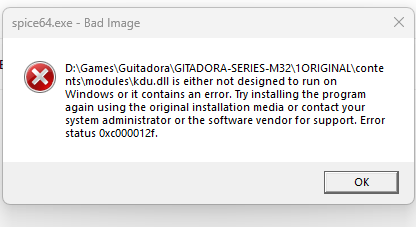
12 hours ago, jaucent23 said:
Hey recently picked up a Guitar to play, have been having issues setting the game up, would appreciate some assistance.
Any idea what to do with this error messages?
did you download from the terabox link in this thread? I looked at those and they are missing a bunch of DLL files (such as kdu.dll that your warning message is telling you) - you need to get better files elsewhere or wait for reupload.
1 -
14 hours ago, Dywill said:
Hello, maybe this is common issue but I still not find a way to fix it
All I do is updating the game to 2024121000, replacing the afp-core.dll and afp-util.dll and do nothing in setting/options, (and yes the url is localhost:8083) but every time I tried to access my card its always encountered with this screen, can anyone give a solution about this? (Log attached below)a
Log :
It's almost certainly your asphyxia plugin, which version are you using?
2 hours ago, KazunokoShimamuri said:Hey all, trying to get my copy of SDVX working but it won't launch. It's not the latest version, just the KFC-2024110500 AIO. I've added the log, and would appreciate any help I can get 🙏! Thanks in advance!
You set up the game incorrectly - you are using -exec and -modules together which turns off game auto detection and prevents automatic fixes from being applied. This is a huge no-no.
Instead, follow two-torial, put spice64 / spicecfg and DLLs in the correct folder, and try again. https://two-torial.xyz/games/sdvx6/setup/
0

idMacX + J/Rconfig + JVSemu + SpiceTools + BemaniTools + SegaTools + etc.
dans ARCADE PC DUMP LOADER
Posté(e)
https://github.com/spice2x/spice2x.github.io/issues/603