

Tremolux
-
Compteur de contenus
564 -
Inscription
-
Dernière visite
-
Jours gagnés
1
Messages posté(e)s par Tremolux
-
-
Hi Karis,
I'm having an issue with DL2E, at some point the game starts to play itself then I can see all the different ways for Dirk to die lol
Did you ever experience the same problem ?
Thanks !
0 -
Le 23/11/2020 à 12:43, Karis a dit :
That's weird, but normally X is not for starting game, IMHO the order of the buttons is not eh same on the One. So 2 solutions :
1) You try to assign the keys differently in controls.cfg (it's really easy to edit).
2) You can use JoyToKey. Personnally i do this on my arcade, because my arcade sticks are not Xinput. So i removed the whole mention to gamepad in controls.cfg (only keys) and mapped the keys in JoyToKey. Works very well.
Was able to edit controls.cfg and it works, thank you !
Just needed to replace gamepad_0 by gamepad_1. What's weird is that if I use your individual .bat files to launcha game, my controller is recognized as gamepad_0 but if I use the menu.dat then I need to rename gamepad_0 to gamepad_1 in controls.cfg to have it working...
Dumb question : Is there any way to play Daphne games like Astron Belt in Singe 2 ?
Thanks your your amazing work !
0 -
Il y a 19 heures, Boomslangnz a dit :
Pro mode is option available in teknoparrot which unlocks Professional Edition which gives widescreen support and various other changes
Oh ok, thanks ! The game I downloaded from this very page sports widescreen and have all tracks unlocked already. Just tried to activate the profesionnal option by curiosity and it makes the game crash on lauch lolJust needed to tick Professional Edition Hold Gear box too and now it works ! With dgvoodoo I'm now able to run the game in full HD with the correct image ratio, plus there are new cool options in the menu for cars, that's terrific !!
 0
0 -
To me the game looks decent with dgvoodoo, I'm really enjoying it. In fact it's one of my favorite arcade driving game by now as it's no so arcade oriented (fast and furious games are fun, but...)
Driving sensation are pretty good, especially with FFB even it's not perfect. But hey ! all that stuff is free and made possible thanks to talented guys who are working on it, i'm so admiring !
Btw, what is the "pro mode" for this game everybody's talking about ?
0 -
Il y a 1 heure, Karis a dit :
That's weird, but normally X is not for starting game, IMHO the order of the buttons is not eh same on the One. So 2 solutions :
1) You try to assign the keys differently in controls.cfg (it's really easy to edit).
2) You can use JoyToKey. Personnally i do this on my arcade, because my arcade sticks are not Xinput. So i removed the whole mention to gamepad in controls.cfg (only keys) and mapped the keys in JoyToKey. Works very well.
Thanks a lot, will try to edit controls.cfg !
0 -
Nope, xbox one...it's weird because it works in the menu, I can select a game with the joystick and launch it by pressing the X button (maybe all 4 buttons work, not sure) but In game it doesn't work anymore. Can't start the game with the start button for instance...thank you anyway !
0 -
Le 25/10/2020 à 22:51, Karis a dit :
CONTROLS:
1 or Start : Start the game
9 or Right Thumb : Options menu
Left Control or Button A : Action
Left Alt or Button B : Action 2 (used as feet in Cliffhanger)
Arrows or pad : Move
Esc or Start+Select : Exit
Hi and thank you, this is really cool !
I can play action games with my keyboard but my xbox controller just doesn't seem to work...
Any idea ?
Thanks !
0 -
Il y a 6 heures, holmes a dit :
Pas vraiment, j'ai trouvé ça quelque part dans la doc du FFBPlugin.

Ah ben c'est marrant ça, j'allais justement demander si c'était normal qu'il n'y ait pas de choc lorsqu'on rentre de plein fouet dans un adversaire ! A part ça je trouve que ça n'est pas si mal...
0 -
il y a 30 minutes, Trymado a dit :
Sur le serveur de patch il y a un pack que j'ai fait déjà tout configuré et prêt à être utilisé
Super, merci
0 -
Le 23/08/2020 à 04:24, holmes a dit :
Is it possible to get full HD and FFB?
I tried Dgvoodoo for HD and Boomslangnz 's plugin for FFB. Since they both use modified Dx3d9 dll, they do not seem compatible.
EDIT: you can rename the dll for the FFB plugin. I used winmm.dll
Thanks, you're a genius !! :D
0 -
J'ai trouvé, c'était pas si compliqué !
0 -
J'ai finalement téléchargé la version Teknoparrot ici même et le jeu fonctionne nickel, donc merci ! En plus je le trouve vraiment sympa, je ne le connaissais pas du tout. Le seul truc qui fait mal c'est la résolution de 800X600, existe-t-il un moyen simple de changer la résolution ? J'ai vu une vidéo sur youtube qui le fait tourner en HD avec Teknoparrot donc ça doit être possible ^^
J'ai téléchargé dgVoodooCpl mais pour l'instant je ne comprends pas trop comment cela fonctionne et surtout je ne sais pas si ça marche avec la version Teknoparrot du jeu...
Merci d'avance pour vos réponses/conseils avisés !
0 -
Salut à tous,J'ai configuré ma manette xbox one mais visiblement elle ne fonctionne pas avec ce jeu...une idée ?Merci d'avance !Oups, désolé, j'étais passé un peu vite sur les post précédents ! ^^
0 -
Hi,
When I set the resolution to 1920x1080 (my native TV resolution), items don't appear in the frame, any idea ?
Thanks
0 -
il y a une heure, Dutchman2000 a dit :
yep, it’s not missing on my system either. I just did a complete format and reinstall of windows 10, a fresh install of all of the visual c++ libraries and it did not solve the problem. There are no other programs installed right now. I think it might be related to the hardware in our computers.Yes I came to that conclusion too...it works (really slowly) on my 8 years old+ desktop, I may find a used GPU and see what happens :D
0 -
il y a 22 minutes, ulysees76 a dit :
You can always try windows compatibility modes to see if it will run by making some changes. Run for example as windows 8.
Already tried this with no success, unfortunately....
0 -
il y a 22 minutes, ulysees76 a dit :
You can always try windows compatibility modes to see if it will run by making some changes. Run for example as windows 8.
Already tried this with no success, unfortunately....
0 -
il y a 22 minutes, ulysees76 a dit :
You can always try windows compatibility modes to see if it will run by making some changes. Run for example as windows 8.
Already tried this with no success, unfortunately....
0 -
Le 11/06/2020 à 19:29, Dutchman2000 a dit :
Yes, that is what I get too, check Event Viewer for the error about RSLauncher and see if it is the same as mine.
RSLauncher keeps crashing.
Faulty module name : MSVCR100.dll
Note that this dll was not missing on my system.
Anyway I've uninstalled all my visual C++ packages then reinstalled the all-in-one package to make this as clean as possible but the problem's not solved...very annoying ! :-/
0 -
I just noticed that it is the only game using OpenParrot (x64) emulator and it's the only one that doesn't work...
0 -
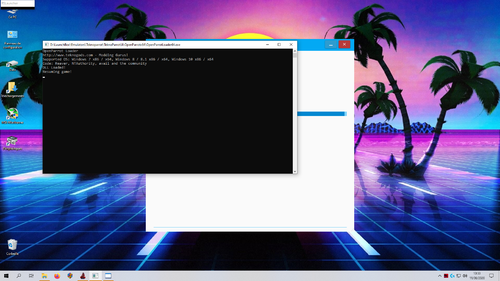
Still unable to make this game work, it's driving me crazy !!
When I launch it with teknoparrot UI, a small RSLauncher window appears in the upper left of my screen (see attached) for a couple of seconds then it crashes...
I tried to launch RSLauncher.exe directly but then I ended up on a black screen with some red error messages (I/O, projector, etc.) along with a loud alarm signal !! :D
Seems to be such a cool game, I really don't understand what's wrong with my desktop...
 0
0 -
il y a 10 minutes, petje a dit :
cpu has igpu ?
Thanks for the fast answer !
Unfortunately It's an intel core 9400F wich I believe don't have an igpu...
0 -
Hi,
The game works on my laptop but is unplayable (because of his poor specs) but keep crashes on launch on my desktop equipped with a nvidia gtx 1650, any ideas ?
Thanks to all !
0 -
Le 22/12/2017 à 21:38, cyrille2hk a dit :
9.Indépendament des séquences 1 à 8, Pour accéder au test mode:
1.Télécharger les drivers DESKEY (DS2) via le site official http://des.co.uk/support
2.Puis lancer le shell (une fenêtre s'ouvre avec ERROR! SECURITY 2)
3. Appuyer sur la touche "T" puis utiliser "Y" pour vous déplacer et "T" pour entrée dans les menus correspondants
Salut à tous, j'essaie désespérément d'entrer dans le test mode du jeu pour pouvoir baisser le volume de la musique mais pas moyen...j'ai bien installé les drivers DK2 mais lorsque je lance le shell ça crashe direct, j'ai juste une fenêtre noire qui s'affiche une demi seconde et plus rien ! Une idée ? Merci d'avance.
Ci-joint le rapport d'erreur si ça peut aider...
Problème résolu ! C'était la sortie audio HDMI qui posait problème, j'ai trouvé la solution ici-même :-) Merci à tous les membres actifs de cette communauté qui font un travail incroyable !
0
[SINGE 2] New LD Engine + Games (3.32 update + DLIIe surprise)
dans ARCADE PC DUMP LOADER
Posté(e)
What instrument do you play ?